After the SEM course last semester, some students began to ask me some questions about stats. After I taught them some basic stats, I found that there are lots of similar questions. And they seem hard to tell the difference and similarities between different tools. So I have been planning to write some notes about stats based on my own understanding, and hopefully, these tutorials may be helpful to others to learn the basic stats in communication.
From my experience in learning stats, there are only three questions that need to pay attention to if the aim is only application in social science research:
- What is the aim of the statistical tool?
- What are the criteria to make judgment (i.e., what are results in the output should be looked at and what should be reported)?
- How to get the results by software* and what indices/coefficients should be reported?
*For this question, I wanted to recall the steps and syntax when I was a beginner. But now, I don’t bother memorizing the steps and syntax. I simply make sure I understand the purpose of the steps/syntax (if it’s syntax, then I need to know how to interpret it), and where I can find the steps/syntax (e.g., through a search engine or tutorial). I relearn the steps whenever I need to use them. Sometimes, I believe that the software itself is of the least importance.
The table below lists the basic stats method that most commonly used (note that the language I used here is not very accurate and professional, because I think professional language sometimes impede understanding):
| Statistical test | Aim | Criteria | Software |
| t-test | Compare means (2 groups) | H0: means of the two variables are equal. p<0.05 indicates the two means are different. | SPSS |
| ANOVA | Compare means (3 or more groups) | H0: means of the two variables are equal. p<0.05 indicates the two means are different. Using post-hoc analysis to compare each pair of means. | SPSS |
| Chi-square test | Correlation between two nominal/ordinal variables | H0: the two variables has no relationship. p<0.05 means the two variables are related. | SPSS |
| Correlation | Correlation between two variables | H0: the two variables has no relationship. p<0.05 means the two variables are related. | SPSS |
| Regression | Multivariable correlation | H0: coefficient of the regression model = 0. p<0.05 means coefficient is not zero, which means the independent variable is related with the dependent variable. The the direction of the coefficient means the relationship is negative or positive. | SPSS |
| Mediation | Mediation | Examining the products of two coefficients. Bootstrapping method is now widely used to examine mediation effect. For bootstrapping method, 95% CI does not straddle zero means the mediation effect exist. (It is the same logic with p-value, if contain 0. High probability that the coefficient is zero) | PROCESS/Mplus/AMOS |
| Moderation | Moderation/interaction | p-value of the interaction term. p< 0.05 indicates the interaction effect exists. | SPSS/PROCESS/Mplus |
| EFA | Exploratory factor analysis, which is usually used for scale development. | Factor loading | SPSS |
| CFA | Confirmatory factor analysis/measurement model, which usually aims to confirm the measurement scale. | Model fit, Factor loading, CR, AVE | Mplus/AMOS |
| SEM | Measurement model + structural morel | Model fit and coefficients of each path. | Mplus/AMOS |
Some notes about this table:
- I think p-value and the idea of latent variable are the two challenges when I was learning them.
- I found many students seems got confused about the difference between EFA and CFA, so I highlighted them in the table.
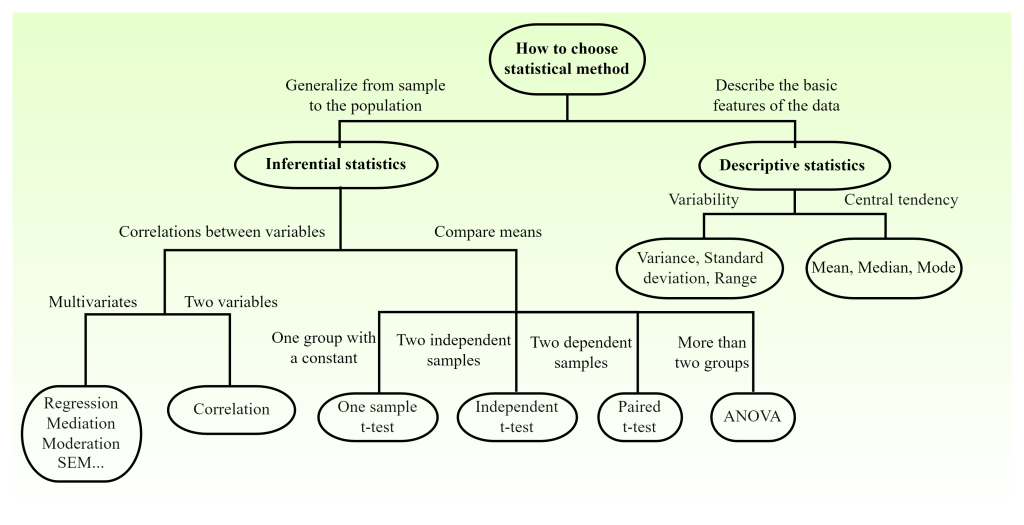
Besides, a figure might help to know the framework of all the basic stats. The below figure was revised from a figure in Li et.al. (2020), which I drew under the supervision of Prof Li Wu in 2019)
 Ai Pengya
Leave a comment